Friday, December 14, 2012

Modcloth and Inflection Drive Performance with Next-Gen Keyword Contextual Targeting

Advertisers use contextual targeting on the Google Display Network to reach new customers as they browse content related to their products and services. In March we launched Next-Gen Keyword Contextual Targeting, which enabled our display advertisers to manage their contextual campaigns with the same level of precision and granularity as search. In a few short months we’ve been delighted to see how it’s translated into real results for our customers, and today we’d like to shine a light on two specific examples.

Modcloth, an online retailer selling vintage inspired clothing, had been using contextual targeting on the Google Display Network as a way to scale their message across a wide variety of sites. Their challenge was figuring out which keywords were triggering which conversions across their multiple product lines. With keyword level reporting and optimization levers, Theresa Rockovich, Modcloth’s SEM Manager, was excited to finally put her SEM skills to work. “Before the ability to target and bid on keywords, we were barely making these campaigns profitable. Now that we’ve been able to adjust our bids and see which keywords are driving performance, margins are the healthiest they’ve ever been.” In nine weeks, their keyword-level optimizations helped turn three unprofitable contextual campaigns into some of their highest performers. Their jewelry lines saw a 460% increase in click-through-rates and their dresses campaign saw a 700% increase in ROI.

Andrew Wong, Marketing Director at Inflection, similarly took a search-focused approach to managing their contextual campaigns. “We took the shell of our search campaigns and copied them onto the Google Display Network” and created specific page URLs for each product line. After a few weeks of generating traffic, they turned on the Display Campaign Optimizer – the Google Display Network’s auto-optimization tool that automatically manages targeting and bidding – and the results were phenomenal. With the help of DCO, they increased conversions by 480% at a cost-per-action 10% lower than the rest of their display campaigns.


Keyword level targeting is one of the many reasons why our Display Campaign Optimizer  has improved in both accuracy and efficiency the past year. We've seen advertisers are usually able to reach their target cost-per-acquisition (CPA) in about two weeks, versus the two months it often took before these changes. Coupled with new bidding capabilities, such as real-time bidding, MaxCPC and Enhanced CPC, DCO is now available to use on ‘hybrid’ search and display campaigns.

And it gets even better
In addition to keyword targeting, bidding and reporting, today we’re announcing  new keyword status messages to assist advertisers troubleshoot for more effective and consistent keyword matching and delivery. Now you’ll know if a keyword is pointing to a suspended site, has been disapproved, or if it matches too few pages (Few Page Matches). We’ve also added a notification that alerts users with display-only campaigns when a Display Network bid - which overrides keyword bids when ads are shown on the Google Display Network - is in place. We recommend removing the Display Network Bid in display-only campaigns to take advantage of keyword level bidding. Click here to learn how.

Learn More
We look forward to seeing even more success stories as we continue to roll out these new features! To learn more about how to implement these strategies into your display campaigns, download the Google Display Network Guide here!

Posted by Katie Hamilton, Product Marketing Manager Google Display Network

Tuesday, December 11, 2012

Education and training opportunities this week

With the holidays rapidly approaching, check out our lineup of educational opportunities this week to maximize your advertising effectiveness through the end of the year:
  • Grab your eggnog for the last Learn with Google webinar of the season. On Wednesday, December 12th at 10:00AM PST, join us for the final session in our Remarketing Series to learn how to use Google Analytics to target website visitors interested in your products and services in the new year. Get more info and register now: http://goo.gl/tI0tl 
  • Looking for an edge during the Holidays?  Join us on December 13th at 11:00AM PST and learn how to create stand-out ads during the competitive holiday season.  Get more info here: http://goo.gl/2FwSp
  • Attention EMEA!  We are hosting a Holiday Hangout on Air on December 13th at 11:00AM GMT. Join us at this special time to learn how to get your ads ready for the Holiday season.  Get more info and register now: http://goo.gl/wrHgc
Hope to see you there, and make sure to stay tuned for additional education and training as we close out 2012!

Posted by Rob Newton, Inside Adwords Blog Team.

Google Shopping: Promotional Credit and Update to Feed Spec for International Merchants

Last month we announced the international rollout of the new Google Shopping model built on Product Listing Ads. Starting in February 2013, Google Shopping in ten more countries will be transitioning to a new experience built on Product Listing Ads. We believe these changes, and the improved user experience, will create new opportunities for merchants and help retailers of all sizes attract more customers to their stores. The new model will be rolled out completely by the end of Q2 2013.

To encourage merchants in Australia, Japan, Brazil, Spain, Italy, France, Netherlands, U.K., Germany and Switzerland to make this transition on Google Shopping, we are offering promotional credit. Merchants who apply and create a Product Listing Ad campaign promoting all of their products in Merchant Center by 12 April 2013 could qualify for this credit. They could also qualify for a monthly credit for 10% of their total Product Listing Ad spend.

To learn more and apply for promotional credit, please visit this page.

Feed Specification Updates

In an effort to improve the data quality on Google Shopping, we have updated our international feed specifications. These changes will take effect in March 2013. They will align our global product feeds more closely and enable us to surface better results to users. Advertisers who are using the reduced Product Ads feed spec will need to bring their feeds into compliance with these new requirements. For more information on the upcoming changes, please visit the Help Center.

In addition to this update, we will also be releasing a new set of Google Shopping program policies. The detailed policies will be announced in January next year.

Posted by Sameer Samat, Vice President of Product Management, Google Shopping.

Thursday, December 6, 2012

How an AdWords expert uses Google Analytics data

Back in October, we made it possible to import and view Google Analytics data in AdWords. We asked Jon Gritton, a Top Contributor in the AdWords Community, why he’s excited about this feature, and what it can offer advertisers.
Jon Gritton, Top Contributor,
AdWords Community
With AdWords as his primary business, as well as general Internet marketing consultancy, Jon describes his work as “a mouthful at the best of times!” He began using AdWords in 2002 while employed at a music distribution company, and has recently celebrated ten years using the program.

What were your first thoughts about this new ability to import Analytics data into AdWords?

To be honest my first thought was, “Why hasn’t this happened before?” It seems such an obvious thing to do now, but I guess that’s true of so many good ideas. The key thing that caught my eye was the Bounce Rate metric: when people on the Community say, “I get X clicks but no sales,” this figure can give them an instant insight into why their clicks aren’t turning into sales, much more quickly than mining through Analytics.

This launch brings some vital data right where you need it. It dramatically reduces the amount of cross-referencing and switching between products that you had to do in the past to analyze and apply the information presented by Analytics.

Can you talk more about the Analytics metrics that you now see inside AdWords?

All three of the metrics are telling you how your visitors engage with your website, and that’s a crucial part of the AdWords process. There’s no point sending people to a site that’s of no use.

Bounce Rate is a measure of how many of your visitors look at just one page of your site, then leave without going anywhere else. If you’re expecting your AdWords visitors to come to two or more pages for a visit, a high bounce rate is a sign of a problem. It’s like a customer opening the door to your store, walking in, then walking right back out again. You’ve got to look at why people are “bouncing.” There can be several reasons (sometimes more than one at the same time). Your site may be too slow to load and needs slimming down, or it may be that your site isn’t what the visitor expects, which might indicate you need to look at your ad copy or keywords to ensure you’re capturing the right audience.

Pages Per Visit and Average Visit Duration are other ways of looking at this visitor engagement, helping you gauge how effective your site is in supporting the AdWords campaign.  You can think of Pages Per Visit like our store visitor looking round lots of shelves and walking into several sections of the store, while the Visit Duration is obviously how long they spend in the shop.  


Anything advertisers should watch out for?

While it may seem clear that you want Pages Per Visit and Average Visit Duration to be as high as possible, bear in mind that they could also be high if the visitor can’t find what they’re looking for, or if the visitor finds your site hard to use.  Equally, a site that’s very quick and easy to use may have quite low figures here without indicating any kind of problem.  Like most things AdWords, you can’t really take one metric in isolation.

Tell us how you’re using these metrics.

For me the primary advantage is in identifying ads and keywords that aren’t “working” with my sites and the Bounce Rate is probably my favorite metric for this.  I hate high bounce rates - I hate the idea that people are coming to the site and just leaving, so I’m always trying to improve these figures.  Being able to see the rates right next to the AdWords components makes it a lot easier to start this process.

I’ve found the metrics can also act as a “defense” for keywords that might otherwise be slated for deletion.  I’ve found a number that I thought weren’t performing well because of poor clicks or conversions, but which I’ve now spotted actually do quite well for site penetration and time.  This data was always there in Analytics, of course, but it’s more “in your face” when you can see it as you work through an AdWords account.

Want to discuss the new Analytics import with other AdWords users? Take part in the discussion on the AdWords Community site. Or visit the AdWords Help Center to learn how to see Analytics data in your AdWords account.

Posted by Cindy Meyers and Virginia Roman, Editors, Online Help

Wednesday, December 5, 2012

Build your digital brand with Google+ Webinar

The Google+ platform provides a fresh canvas to build and strengthen your digital brand while tying into all the marketing you already do with Google. From launching a new product using Google+ pages to engaging with your community of enthusiasts over Hangouts, join our Learn with Google webinar this Thursday for a look at ways your company can build its brand using social. Sign up on our webinar page to attend: Building a Digital Brand with Google+ (Thurs, Dec 6, 10am PT / 1pm ET)

After the Hangout, we’ll host a live Q&A with members of the Google+ team to answer questions about building a brand with Google+. RSVP on the Google+ Event page and add your questions as comments on that page.

With more than 100 monthly million active Google+ users, the time is now to focus on building your digital brand presence via the platform. Google+ has seen a wealth of brands engaging with users in creative, interactive ways. Brands created more than 1 million Google+ pages in just the last few months. For instance:
  • H&M -- The retail clothing company, with more than 2 million Google+ followers, uses tailored content, images and video to bring its fashions to life on the platform. They’ve utilized Ripples to identify their trendsetters and saw a 22% boost in clickthrough rate after implementing social extensions in AdWords.
  • Cadbury -- The chocolate maker has built a following of nearly 3 million users with a combination of creative posts, Hangouts on Air and even the launch of their Dairy Milk Bubbly bar. They’ve also installed the Google+ badge on the company’s web homepage, making it easy as chocolate to follow the brand.
Like the ideas here? Log on Thursday to learn more about how to create, capture and sustain demand for your brand using Google+. And if you’re going to miss this while you’re at SMX Social in Las Vegas, check back at the webinars page later for a recording.

Announcing a new Google Ads Hangout on Air series - “Happy HOAlidays”

The holidays are crunch time for many advertisers out there, so we’re introducing a new holly, jolly Hangout on Air series on the Google Ads +Page. In this three-part series, AdWords specialists from the 866-2-GOOGLE support team will cover three important topics surrounding your AdWords performance during the holiday season.

December 6 at 11 AM PDT: How to keep your ads from going dark during the holidays 
We’ll discuss tips and tricks for how to manage your account effectively when you might be out of the office on holiday break.

December 13 at 11 AM PDT: How to create stand-out ads during the competitive holiday season
We’ll share the best strategies for setting yourself apart from your competition.

December 20 at 11 AM PDT: How to maintain the holiday momentum
We’ll tell you how to assess your holiday performance and engage your new customer base into the new year.

To join the Hangouts, just sign into Google+ and add the Google Ads +Page to your circles. Each week we’ll put up a post soliciting your questions. Then, on Thursday, navigate to your Stream where you’ll be able to view our Hangout live with just one click. See you there!

Thursday, November 29, 2012

Dialing up on click-to-call

Mobile technology is making it easier than ever for people to research products and connect with businesses while they’re on the go. But we all know that sometimes it helps to speak to a real person before making a purchase decision. In fact, research shows that 52% of smartphone users have called a business after looking for local information on their mobile devices. Calls are key in helping consumers connect with businesses in the digital age, so incorporating a click-to-call strategy on mobile is crucial for any company that does business over the phone.

Companies big and small have put click-to-call functionality front and center in their mobile ads to reach customers on the go, and have seen impressive results. For instance, Comcast incorporated click-to-call ads into their mobile strategy, and now find mobile drives more than 10% of online sales. Esurance also reduced their cost per acquisition by 20-30% compared to other channels by using Google mobile ads with click-to-call. With more than 20 million calls made through Google click-to-call ads each month, it’s clear that mobile works when driving calls to businesses. In fact, our studies have shown that adding Call Extensions to mobile ad campaigns have improved advertisers’ average click-through rates by about 6-8%.

But as any business knows, getting customers to call is only half the battle. That’s why we’ve invested in features like Google call forwarding numbers, which show detailed reporting on calls generated from your ad campaign such as call start and end time, duration and caller area code. Having this valuable information can help advertisers understand how effective their ad campaigns are at driving calls as well as the quality of those calls. Advertisers using Google call forwarding numbers see calls last over six minutes on average.


We’re working hard to continually improve the click-to-call experience for advertisers and consumers. Here are a few of the things that our team has recently been hard at work on:

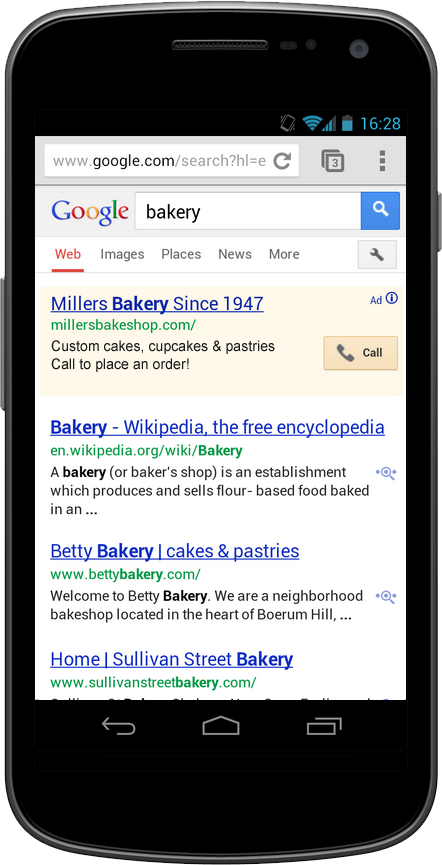
  • Click-to-call button - We recently introduced a new click-to-call button for ads leveraging Call Extensions, which people can easily tap to call businesses. Early results indicate that this new design positively impacts advertiser click-through rates and call volume.
  • Expanding availability of Google call forwarding numbers - We’re also focused on bringing Google call forwarding numbers to more advertisers so they can better measure the full value that mobile is driving through calls. Already available in US and UK, we recently expanded availability to Germany and plan to expand availability to additional countries in the coming months.
  • Call Extensions for in-app ads - We also recently introduced Call Extensions for ads showing in apps on the Google Display Network. Now in addition to click-to-call ads across the mobile web, advertisers can also drive calls from ads in more than 300,000 mobile apps.

New click-to-call button
If you haven’t yet tried Call Extensions in your mobile campaigns, you can find instructions for enabling in our Help Center. We will also be hosting a webinar on December 5th focused on tracking call performance in your AdWords campaigns. To register for this webinar, click here.

Posted by Anurag Agrawal, Product Manager, Mobile Search Ads