Tuesday, June 25, 2013

Bringing intent, context, and audience together for better performing search campaigns

Along with a user's query, context signals like location, time of day, and device have become increasingly important in showing people the right ads with their search results. With enhanced campaigns, it's now easier to reach people in the moments that matter across all screens, with ads that are more relevant to a user's intent and context. Now we're incorporating another powerful capability to tailor your search campaigns for different audiences – remarketing lists for search ads (RLSA). With this feature, you can modify your search ads, bids, and keywords based on your visitors' past activity on your website. As we transition out of the beta test of RLSA, announced in July 2012, we'll be making the feature available to all advertisers using enhanced campaigns over the next few days.

Combining intent, context, and audience for better search ads 
Search ads work great because they're relevant to the user's intent and context. And users who have recently visited your website often find your ads to be even more relevant. RLSA brings intent, context, and audience together to let you tailor your search campaign when past site visitors are searching on Google for your brand, products, and services. Here are some ways to improve your campaign performance using RLSA.
  1. Increase ad visibility for high value customers by adjusting your bids. For example, you could increase your bids by 20% for visitors who have previously researched high-end cameras while on your site when they subsequently search for ‘cameras’ on Google. And you could increase your bids by 40% for past site visitors who have previously purchased high-end equipment from your site. It's easy to set up RLSA bid adjustments and they combine with other enhanced campaigns bid adjustments for location, device, and time.

  2. Expand your reach and results with broader keywords. For example, bidding on broad keywords such as ‘gifts’ or ‘presents’ during a holiday season might not convert well enough to meet your ROI goals. But if you use RLSA to run those keywords just for repeat customers, they may convert better and allow you to grow your total sales with a profitable ROI. 
Advertiser success with RLSA
Advertisers in the beta have seen strong results with RLSA. Here are some examples:
  • Tirendo, a European online tire retailer, saw a 161% conversion rate increase with RLSA, leading to a 22% overall sales increase. And the incremental conversions were efficient, with a 43% lower average cost per order than previous campaigns. Read more.
  • WorldStores, a leading UK home furnishings and garden store, increased total orders 8% by using RLSA to increase bids for past site visitors. Conversion rates for this segment were 130% higher and average cost per conversion was 43% lower, even with the higher bids.
Tags and list management
RLSA shares the same site-wide Google Remarketing Tag and list management tools as remarketing on the Google Display Network (GDN). So you can start using RLSA immediately if your website is already tagged for remarketing on the GDN.

Transparency and control for users
We believe users should have transparency and be in control their ad experience. That's why we provide adjustable Ads Settings and inform users when an ad has been influenced by a past visit to a particular advertiser's website.

Learn more
For help getting started with RLSA, check out this article in the Help Center. You can also join us at tomorrow's Learn with Google Webinar: Reaching the Right Audience with Remarketing on Wednesday, June 26, 2013 at 1pm ET.

Posted by Rahul Lahiri, AdWords Product Manager

Monday, June 24, 2013

New top movers report to track how your ad performance has changed

Many of you start each day by asking: What is driving a change in my clicks or cost? What campaigns or ad groups saw the the largest moves? Did any of my recent changes break something?

To help answer these questions, we’ve created the top movers report to show you which campaigns and ad groups have experienced the largest changes in clicks and cost, and highlight changes you made which might have contributed to those moves. Even if your overall account performance metrics appear unchanged, the top movers report will look inside your campaigns to highlight big moves that might have been easily overlooked.

How it works
To view the top movers report, click the Dimensions tab, then View: Top movers. The report compares performance for two consecutive time periods of equal length, and finds the campaigns and ad groups that experienced the largest change between the two periods. You can compare periods of 7, 14, or 28 days, or look at reports generated in the last 90 days.

The report will start by finding up to 10 of the largest moves in clicks or cost and present a summary at the top. If a top mover saw an increase, it goes into the “Top increases” category. If it’s a decrease, it goes into the “top decreases” category. When changes aren’t significant enough to be a top mover, they will roll up into “Other changes.”


The table below will give details for each top mover. When possible, we offer a “possible cause” for the move, like “bids were increased” or “new keywords were added”.


Note that “possible causes” only considers changes made to your account. It won’t tell you, for example, if your competitors have raised their bids or introduced new ads.

Top movers is our latest effort to save you time and money by helping you understand changes in performance.  For additional information about using this new report, visit the AdWords Help Center.

Posted by David Rodriguez, Product Manager, AdWords

Reconnect with site visitors using beautiful, customized dynamic ads

As we continue to expand our advertising solutions, our goal is to provide a great user experience for both advertisers and consumers. We know that advertisers are always looking for new ways to reach their customers with compelling ads that drive engagement and conversions. Today, we are excited to announce the launch of dynamic remarketing to all clients with a Google Merchant Center account. We are also currently piloting this new feature in the travel and education sectors and plan to expand availability to more sectors later this year.

Beautiful, tailored ads to reconnect with customers
Dynamic remarketing lets you automatically create beautiful, customized ads that connect with shoppers across the web, by reminding them of items they've seen on your site. You can build ads quickly with dozens of templates to choose from that you can customize to reflect the design elements of your brand. We have also made it easy to get started by automatically creating dynamic text and display ads for you.

Sample dynamic ads (see more here):


Advertisers have seen great results compared to their traditional remarketing campaigns:
  • Sierra Trading Post, a U.S. retailer of outdoor gear and clothing, saw a 2x higher clickthrough rate and a 5x higher conversion rate
  • As Europe’s premiere “heavy metal online shop,” EMP Merchandising grew conversion rates by 230% and decreased their cost of sale by 30%.
You can read more about other client successes on Think Insights.

Optimizing dynamic ads to drive performance
Dynamic remarketing delivers tailored ads across the web that combine the layouts, products, messages and offers that your customers are most likely interested in, based on what they viewed on your website. You can benefit from our:
  • Auto-optimized layouts which predicts the best performing layout for each impression
  • Product recommendation engine which optimizes the combination of related and popular products that show in your ads [Learn more]
  • Real-time bidding algorithm which helps boost performance by calculating the optimal bid for each impression
For help on getting started reference this Help Center article.

Making it easy for advertisers
Managing campaigns more efficiently is just one of the many benefits of remarketing with Google. Last year, we introduced a site-wide remarketing tag and remarketing with Google Analytics that both made it easy to get started with your campaigns. You can also use the tag to discover new customers similar to your site visitors with Similar Audiences, which has been recently made available to all clients in AdWords.

Remarketing drives great ROI for advertisers, it can also bring publishers significant revenue lift, as studies have shown, and compelling ads for consumers. We’ve also given consumers options to exercise control over their ad experience with features like the Ads Settings and Mute this Ad.

To learn more about what remarketing with Google can do for your business, register for our upcoming Learn with Google Webinar: Reaching the Right Audience with Remarketing on Wednesday, June 26, 2013 at 1pm ET.

Posted by Aitan Weinberg, Group Product Manager

Friday, June 21, 2013

Inventory-aware campaigns: automatically create and optimize search campaigns

This post originally appeared on the DoubleClick Search blog.

Since launching our inventory-aware campaign solution in DoubleClick Search back in August, we’ve been busy improving the tool with new ad template functions and in-UI instruction management. Today, we’re excited to announce the ability to automatically create and optimize campaigns, based on your Google Merchant Center feeds. We know that keeping your search campaigns up-to-date with changing inventory can be time-intensive and cumbersome. With this new feature, we wanted to deliver a simple solution for this complex problem, to help you go faster, with smarter tools that streamline your workflow. With inventory-aware campaigns, manage even the deepest product catalogs with just a few clicks, helping you create new search campaigns on the fly.


How inventory-aware campaigns work
Inventory-aware campaigns in DoubleClick Search automatically create ad groups, ads, and keywords based on the settings you provide. Our system monitors your Google Merchant Center feeds for changes, and makes any necessary updates automatically to ensure you don’t miss any opportunities. This means that when the newest prices, descriptions, and landing pages are sent to your product feed, DoubleClick Search will pick up the changes and apply them to your campaigns, without the need for you to set them up manually.

Creating inventory-aware campaigns
Creating an inventory-aware campaign is simple, with a flow that's similar to manual campaign creation.


After linking your Merchant Center account to DoubleClick Search, you can create a new campaign and be up and running in three easy steps:
  1. Select an engine account in the left-hand navigation of your DoubleClick Search account 
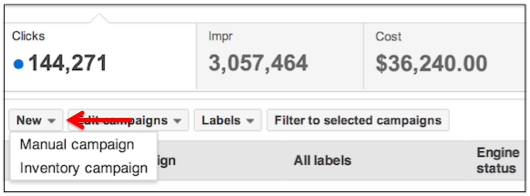
  2. Click New above the table of existing campaigns, and then select Inventory campaign from the dropdown. 
  3. Complete the configuration steps for how your ad groups, ads, and keywords will be generated.
To learn more about this update to inventory campaigns, visit the Help Center article, and stay tuned to the DoubleClick Search blog to follow more developments on our inventory-aware campaigns.

Posted by Kim Doan, DoubleClick Search

Wednesday, June 19, 2013

See the full Impact of Unclicked Display and Video Ad Impressions using Google Analytics

Originally posted on the Google Analytics blog

Every customer journey is different — a customer may see your display or video ads, receive an email, and then click through to your site from a search ad or organic search listing. Often, viewing display ads can attract your clients’ interest in your product and brand even if no click occurs. Traditionally, measurement technology separated out impressions or “view throughs” from clicks, but this separation missed out on valuable data on the impact of display advertising.

Thanks to our integration with the Google Display Network (GDN), Google Analytics can now break down the separation between clicks and impressions and give a more complete view of the customer journey. When a user views display ads on the GDN, or video ads on YouTube, and later visits your website and converts, these interactions with your brand can now be captured in Google Analytics Multi-Channel Funnels reporting.

GDN Impression Reporting is now available through limited whitelist. You can sign-up through this form to participate. Please note that we cannot guarantee access, but we will do our best to provide this feature to as many users as possible. Please also note that this data will only surface in the Multi-channel Funnels reports in Google Analytics. For more information on how to enable the feature in GA please see our help center article.

Read on below for more tips on how to make the most of this new feature.

How does Display fit on the conversion path?
By enabling GDN Impression Reporting in Google Analytics, you can learn how your display impressions assist your conversions.


In the Multi-Channel Funnels Overview Report you will see two additional conversion metrics. Impression Assisted Conversions shows how many of your conversion paths were touched by a display impression. Rich Media Assisted Conversions shows how many of your conversions had a rich media interaction on the path to conversion. Rich media interactions are user interaction with YouTube or rich media ad formats, such as ad expansion, video control (such as play, pause, and resume), or switching a video ad to full screen.

With the new Interaction Type selector you can now immediately filter your reports based how your users interacted with your marketing.

  • Select Impression to see conversion paths from customers who saw your GDN display ads but did not click on them.
  • Add Direct to the mix, to see who saw an ad and then visited your site directly to convert on a relevant transaction or Goal.
  • If you want to focus on Rich Media interactions, you can select this interaction type to see how your users convert after interacting with your rich media and YouTube ads.

How do I quantify the impact of display on the conversion path?
In the Multi-Channel Funnels Top Conversion Path report you can see two new path elements, which indicate the presence of a display interaction. The “eye” symbol indicates a pure display impression from a non-interactive display image. This means a user has been exposed to your display ad on the journey to conversion, without clicking on it. The “movie” symbol indicates a user has interacted with one of your Rich Media ads, such as a YouTube video ad.


Now you can see how many conversion paths, and how much associated value, has been driven through paths which benefited from a display impression or rich media interactions. To better quantify your brand targeted display efforts, consider breaking out these campaigns using custom channel grouping.


Assigning partial credit to valuable display interaction touchpoints
You can use the custom model builder from the Attribution Modeling tool to assign partial credit to these display events. Consider giving these events on the user’s conversion path more credit, and compare this against your baseline model.

We also added a new set of dimensions to help you define valuable custom segments for your analysis. Want to see how many users are watching your TrueView video ads fully? Just create a custom segment using one of our new dimensions, TrueView. The full list of new dimensions is:
  • Above the Fold: This dimension uses the Google Active View measurement solution. The value is “Yes” if the ad was in the visible area of the screen when the page was loaded.
  • Video Played Percent: The value can be “>=25%”, “>=50%”, “>=75%”, and “100%”, allowing you to see how much of a video ad was watched.
  • TrueView: If a user has watched more than 30 seconds of an ad, or watched the ad completely, this will have a value of “Yes.” This is a payable event.
Enabling GDN Impression Reporting in Google Analytics
Once we have whitelisted your account, please ensure you have successfully linked your AdWords account to your Google Analytics account. Linking accounts takes just a few moments. Under ‘Data Sources’ > ‘AdWords’ you can then see an entry for each linked AdWords account. In the row there is a toggle switch named ‘GDN Impression Reports’, which turns the display impression data from the Google Display Network On and Off. Data is recorded from the time the switch is turned On.


We hope these new tools will help you understand the full impact of your display campaigns through Multi-Channel Funnels and Attribution. Sign up today for GDN Impression Reporting in Google Analytics.

Tuesday, June 18, 2013

Give your sitelinks additional detail in enhanced campaigns

Ads that provide detail and precision can help people make more informed decisions. Sitelinks help people find information deeper in your site so they can get to where they want to go faster. In February 2012, we improved sitelinks by using text from other ads in your account or My Client Center to create sitelinks with additional detail. Today, we’re going one step further by enabling you to nominate specific text for your sitelink descriptions from within your AdWords account. This will allow you to control the descriptions that display when this sitelink format shows.


In our testing, users have reported that sitelinks with additional detail were more useful and relevant, and clickthrough rates were significantly higher than the same ad with traditional 2- and 3-line sitelinks.

The new sitelink format with additional detail is available only in enhanced campaigns with upgraded sitelinks. Enhanced campaigns enable you to reach people with the right ads in the right context - location, time of day and device type - without setting up and managing numerous campaigns. All campaigns will be upgraded to enhanced campaigns on July 22nd.

After upgrading to enhanced campaigns, you will have the option of adding extra text to your sitelinks - simply fill out both lines of the "Description" field when creating a new sitelink or editing an existing sitelink.


Note that your ads won't always show sitelinks, and when they do, the format that appears could vary.

The core guidelines for sitelinks remain the same with these improvements:
  • Sitelinks cannot violate the duplicate sitelink URL policy
  • Sitelink text cannot use keyword insertion
  • In addition to this 4 sitelink view, there is also a 2 sitelink variation
To learn more about sitelinks with additional detail, check out the sitelinks article in the AdWords Help Center.

Posted by Conrad Wai, Product Manager, Ad Formats

AdSense: Celebrating 10 years of shared success

Originally posted on the official Google blog

Ten years ago we launched AdSense to help publishers earn money by placing relevant ads on their websites. I can still remember the excitement and anticipation as AdSense went live that first day.  Our small team huddled together in a cramped conference room, and right away we saw that publishers were as excited about AdSense as we were.

Fast-forward 10 years, and AdSense has become a core part of Google’s advertising business. The AdSense community has grown to include more than 2 million publishers, and last year alone, publishers earned more than $7 billion from AdSense. AdSense is a community that thrives because of all the content creators we are so fortunate to partner with. Their stories inspire us to do our part to make AdSense great.

On this occasion, it’s especially inspiring to hear the stories of partners who have been with us since the very beginning—like a retiree in New Zealand who was able to pursue her dream of writing about her garden, a tech support expert in Colorado who can spend more time with his kids, and a theme park reviewer who now sends employees around the world to test and review rides—all thanks to money earned from AdSense.

As part of our 10th anniversary celebration, we hope you’ll tune into our live Hangout on Air today at 10 a.m. PDT (5 p.m. GMT) on the AdSense Google+ page. I look forward to joining several of our partners to share stories from the early days of AdSense, talk about how we’ve all grown since then, and discuss the future for publishers and online advertising. And if you want even more 10th anniversary celebration, just visit our AdSense 10th anniversary page at any time.

Posted by Susan Wojcicki, SVP, Ads and Commerce